Buying a used instrument requires a methodical approach. Today’s market offers a wide range of models with varied technologies and sounds.
Before any visit, determine your budget, the type of keyboard you want, and the essential features you need. These criteria help you quickly identify good value for money.
During the inspection, check the overall condition, the integrity of the wood, the responsiveness of the keys, and the polyphony. Also test the speakers, headphone output, and USB/MIDI connectivity.
Yamaha remains a benchmark for durability and sound fidelity. For a detailed checklist and practical steps, consult this comprehensive guide to buying a used instrument wisely.
A thorough inspection prevents unpleasant surprises and ensures a lasting playing experience. Take the time to test every model before making your final choice.
Why Choose a Used Yamaha Digital Piano: Tips Before Choosing
Buying a second-hand instrument can offer excellent value for money, especially with high-end models. Quality digital pianos often remain expensive and may make purchasing a new instrument difficult.
Choosing a used version provides access to a solid range on a smaller budget. Instruments in nearly new condition can be found on French platforms.
The brand’s durability makes these models attractive on the second-hand market. A good choice depends on carefully checking the electronic and mechanical components.
“You can find instruments in excellent condition that offer a playing experience close to that of a new model.”
Key points:
- Compare the price with the new price to assess value for money.
- Check the polyphony, keyboard, and essential features.
- Consider resale value, which often remains high for this brand.
Visual Inspection of the Instrument
Start by examining the exterior casing for any signs of impact or weakness. A methodical inspection will help you assess the model’s quality and maintenance without opening the instrument.
Condition of the Cabinet
Check the cabinet for cracks, chips, or deep scratches. Structural damage affects both appearance and durability, especially if the instrument will remain visible in a living room.
Also check the legs and supports: they should be stable and free from play. Frequent dismantling by previous owners may have weakened these parts.
Signs of Wear
Inspect the keyboard and keys for yellowing or uneven wear. Minor cosmetic marks are normal, but premature wear may indicate intensive use.
Make a quick comparison with an acoustic piano: on the latter, you can inspect the strings and hammers, whereas an electronic model requires checks of the external components and cabinet. For additional purchasing guidance, consult our guide to buying a used instrument.
“A careful visual inspection prevents many unpleasant surprises when buying.”
- Look for cracks and chips.
- Test the stability of the supports.
- Check the condition and consistency of the keys.
Checking the Keyboard and Pedals
A precise check of the keyboard and pedals often reveals the instrument’s true condition.
Test all 88 keys for responsiveness and smooth movement. The keys should respond consistently, without sticking or squeaking.
Listen for noises: clicks or squeaks may indicate worn sensors or faulty connections. Non-working keys often point to costly repairs.
The sustain pedal is essential. It should be quiet and allow gradual modulation of the sound. A pedal that is too loose or too stiff hampers playing and may increase the final budget.
- Check the consistency of the weighted action, which reproduces the feel of an acoustic piano.
- Make sure there is no excessive play in the pedals and that the sound remains continuous when they are pressed.
- Allow room in your budget for possible technical work on older models.
| Component | Good sign | Common problem | Effect on price |
|---|---|---|---|
| Keys (88) | Consistent response | Sticky or non-working keys | Higher repair costs |
| Action quality | Weighted keys with an acoustic-piano-like feel | Soft or uneven action | Less enjoyable, lower value |
| Sustain pedal | Responsive and quiet | Loose or noisy | Adjustment costs to consider |
| Internal sensors | Stable operation | Faulty connections | Electronic repairs |
Assessing Sound Quality
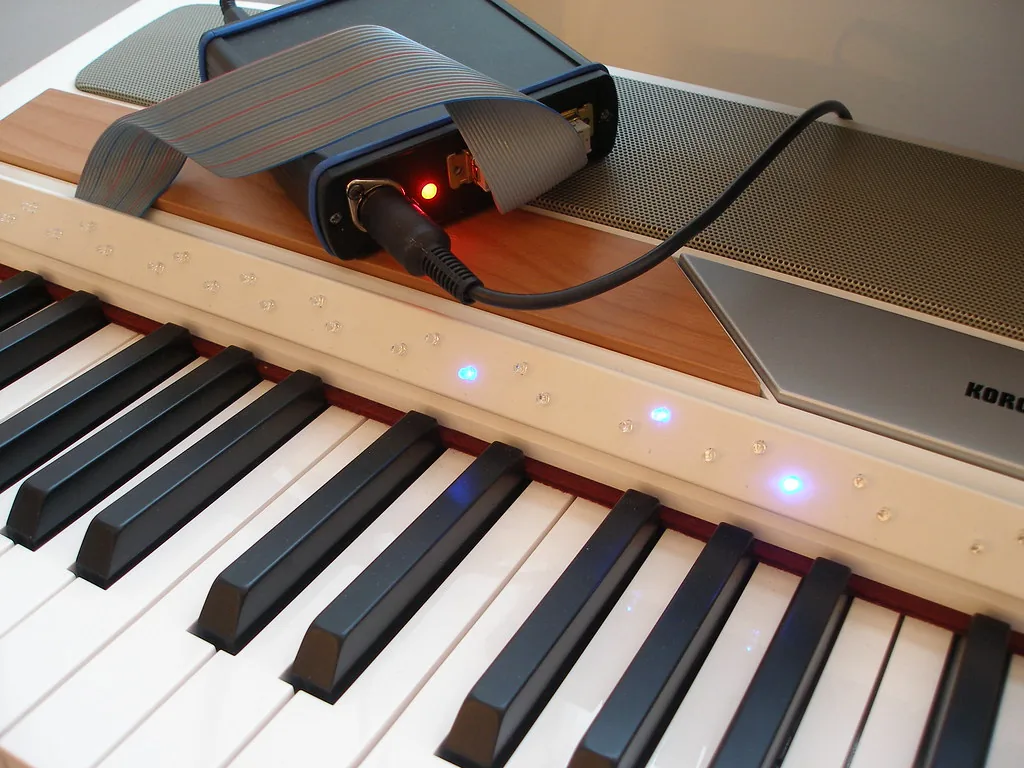
Listen to every register to identify variations in tone or power. Play slow passages and then fast ones to assess the dynamic response and sustain.
Checking Sound Clarity
Test every key individually to detect silent or out-of-tune notes. These often indicate a problem with the internal sensors.
Check for humming, buzzing, or crackling. These noises may indicate defective speakers or amplifiers.
Test the built-in speakers by gradually increasing the volume. They should reproduce the sounds faithfully and without distortion, even at high volume.
“An instrument should provide a consistent, clear, and rich sound across its entire range.”
- Connect headphones to compare clarity and detail.
- Listen to the bass and treble: the sound should remain balanced.
- Compare several models, if possible, to assess overall quality.
Sound quality guides your final choice and protects your budget. A proper audio test prevents unpleasant surprises after purchase.
The Importance of Polyphony
Understanding polyphony helps prevent notes from cutting out during dense passages or when using the sustain pedal.
Polyphony indicates the number of sounds the instrument can produce simultaneously. It is crucial for playing large chords and modern arrangements.
For good value in a used model, look for at least 64-note polyphony. This prevents notes from cutting out during accompaniments or when sounds are layered.
- Play passages with the sustain pedal to make sure no notes disappear.
- If you use effects, aim for 128 or 256 voices for greater headroom.
- Compare sustain between several models to assess sound quality.
“Sufficient polyphony ensures that every nuance and chord can be heard without loss.”
Remember that an acoustic piano does not have this technical limitation. For a guide to getting started successfully, see our beginner piano guide.
Testing Features and Settings
A complete test of the built-in options quickly reveals whether the instrument suits your playing. Check every panel function and how easily the menus can be accessed. These tests help assess the system’s ergonomics and reliability.
Metronome and Recording
The built-in metronome is essential for maintaining a steady tempo during exercises. Test all tempos and the readability of the settings.
Try the recording function: record a short piece to check quality and track management. The transpose function should let you change key without moving your fingers.
Modulation Effects
Test effects such as reverb and chorus. Some models offer several useful presets for different musical styles.
Check sound combinations, such as piano and strings, and make sure there is no crackling when adjusting the volume. Also check the sustain pedal and whether soft and sostenuto pedals can be added for more nuanced playing.
| Feature | What to check | Good sign | Effect on price |
|---|---|---|---|
| Metronome | Settings and tempo | Accurate and audible | Low |
| Recording | Quality and export | Clear tracks, export available | Medium |
| Effects | Reverb/chorus | Varied options, no noise | Medium |
| Volume and pedal controls | Smooth, without crackling | Smooth adjustments | Variable |
To compare series and models, consult a model guide detailing features by range and budget.
Connectivity and Available Ports
Make sure the USB and MIDI connections work correctly if you plan to connect the instrument to a computer for recording or editing.
These ports let you use software such as GarageBand or Logic Pro and access sound libraries. They open up many possibilities for musical creation.
Also check the headphone output: it lets you play silently while retaining clear sound. Test the socket and audio quality with reliable headphones.
Check for Bluetooth support to display digital sheet music or stream files wirelessly. Finally, test the output for external speakers if you are planning rehearsals or concerts.
“Good connectivity turns the instrument into a production hub that goes far beyond simple playing.”
To compare options by range and budget, consult our digital piano comparison.
Overview of Yamaha Ranges
Identifying the model families makes it easier to choose among compact, mid-range, and high-end instruments. This overview presents the leading series and their strengths for different uses.
The Clavinova Range
Clavinova represents the high end. It prioritizes sound quality and excellent, highly realistic action quality.
The CLP-835 (around €1,800) offers GrandTouch-S technology and sampled concert-piano sounds for an immersive playing experience.
The Arius Series
The Arius series offers excellent value for money. It combines elegant design with performance suited to beginners and intermediate musicians.
The YDP-145 (around €860) is a solid entry-level option for limited spaces.
The P Series
The P series consists of portable, lightweight models. They suit travelling musicians and those taking their first steps in learning.
The P-145 (around €400) remains an affordable solution with practical features for portable use.
“Each series meets specific needs: from living room to studio, and from premium to portable models.”
| Series | Use | Example and price | Strength |
|---|---|---|---|
| Clavinova | High-end, home/studio | CLP-835 · €1,800 | Sound quality, action |
| Arius | Entry/mid-range | YDP-145 · €860 | Value for money, design |
| P Series | Portable, beginner | P-145 · €400 | Lightweight, compact, practical |
A Closer Look at Popular Models
Several models stand out for their realistic action while remaining easy to transport.
The P-125 remains a frequent choice for anyone seeking a compact, reliable instrument. It offers good action and convincing sounds at the entry level.
The Roland FP-30 appeals with its rich sound and Bluetooth connectivity. Students appreciate its modern features.
The Privia series (PX-160/PX-770) offers excellent value for money. These models combine sound quality with attractive market prices.
The Kawai ES110 is aimed at musicians seeking a heavy, realistic keyboard feel. Its action and dynamics rival more expensive options.
“These models are often compared with acoustic instruments for their durability and value on the second-hand market.”
| Model | Strength | What to check |
|---|---|---|
| P-125 | Portable, consistent action | Keys, polyphony |
| Roland FP-30 | Rich sound, Bluetooth | Connectivity, outputs |
| Casio PX-160/PX-770 | Value for money | Sound quality, pedals |
| Kawai ES110 | Heavy action, realism | Keyboard, dynamic response |
Assessing the Year of Manufacture
An instrument’s release date often indicates its technological level and longevity. A recent example, ideally five years old or less, generally includes modern features and offers improved sound quality.

Circuits and sensors wear over time, with key sensors and speakers being the most affected components. After several years, reproduction may lose clarity and dynamics.
Wear of Electronic Components
Knowing the year helps you anticipate future work. A recent model reduces the risk of failure and often provides a better playing experience thanks to more reliable action and polyphony.
Remember that unlike acoustic pianos, which can last for decades with proper maintenance, electronic components have a limited lifespan. To reduce the risks, choose a recent example or ask for its repair history.
To prepare your budget and final choice, also consult a practical guide to buying a piano and comparing series by age and features.
Effect of Storage Conditions
Storage conditions directly affect the instrument’s longevity and sound fidelity.
Always ask the seller whether the instrument was kept in a dry place at a stable temperature. Stable storage conditions reduce the risks of condensation and circuit corrosion.
High humidity causes condensation. This damages electronic components and reduces sound quality. Damp basements are often responsible for irreversible failures.
Temperature fluctuations cause some parts to expand or contract. This may result in a squeaking keyboard, sticking keys, or poor electrical contacts.
- Ask the seller about the instrument’s storage history.
- Prefer a model kept in a heated, ventilated interior.
- A well-preserved instrument offers better value and a more reliable playing experience.
| Risk | Cause | Consequence | Action |
|---|---|---|---|
| Corrosion | High humidity | Electronic failures | Ask for evidence of storage in a dry place |
| Expansion | Temperature fluctuations | Misaligned keys | Test the keyboard on site |
| Condensation | Basement storage | Loss of sound quality | Avoid poorly stored models |
Comparing New and Used Prices
Knowing what percentage of the original price to offer helps you negotiate effectively. In practice, most examples sell for between 50% and 70% of their original price, depending on age and keyboard condition.

Reputable brands retain their value better. Roland, Kawai, and one very well-known brand are among those whose sound quality and durability support their prices.
An entry-level model will lose value faster than a professional instrument. This often creates a good opportunity for a buyer on a tight budget.
- Always check the new price to assess value for money.
- Consult several listings and comparison services, such as Leboncoin, to estimate the market.
- Remember that a new acoustic piano costs considerably more, making second-hand instruments very attractive.
“Comparing prices lets you buy a good model without overpaying while retaining room in your budget for possible repairs.”
Effective Negotiation Strategies
Start the discussion by calculating the actual costs: transport, possible repairs to sensors or the wooden cabinet, and replacement of missing accessories. This shows that your offer accounts for the total cost.
If the instrument is several years old or shows signs of wear, use these points as leverage to obtain a significant reduction in the price. A missing stand or sustain pedal also justifies a lower offer.
Offer a reasonable amount and explain the work required on the keys, polyphony, or sound quality. Remain courteous but firm about your budget.
Show that you have compared the value of the model and mention the extra expense of regularly maintaining an acoustic piano. This strengthens the case for a lower offer.
- Base your offer on measurable costs.
- Prepare a counteroffer and remain flexible.
- Maintain a professional attitude to secure the best price.
Piano Logistics and Transport
Organizing the instrument’s transfer requires as much care as examining its condition: poor packing may cause irreversible impacts or scratches.

Although electronic models are generally lighter than an acoustic piano, they remain fragile, particularly when mounted on a wooden stand. Ask the seller whether the cabinet can be dismantled easily without touching the electronic components.
For a long journey, include delivery in your budget. Some specialist carriers provide handling, insurance, and protection against moisture.
- Protection: cover, straps, and reinforced corners.
- Dismantling: remove panels and legs if possible.
- Insurance: request a quote covering damage during transport.
Moving an acoustic piano is far more complex and expensive. By contrast, two properly equipped people can usually transport an electronic instrument without difficulty.
Include these expenses in the final budget to avoid surprises and preserve the quality of the keyboard and keys during transport.
Essential Accessories for Your Setup
The right accessories simplify setup and improve the musical experience. An ergonomic bench ensures stable posture and protects your back during long sessions.
A sturdy stand keeps the keyboard stable, especially if you play the keys forcefully. Choose an adjustable model suited to the height and design of the keyboard.
Headphones and protection: quality headphones let you practise silently while preserving sound clarity. Add a cover and transport protection if you frequently move the instrument for rehearsals or concerts.
Pedals and accessories: depending on the number of sounds and the model’s features, additional pedals may increase expressiveness. Several series offer compatible options to enhance the action and polyphony.
- Ergonomic bench for comfort and posture.
- Adjustable stand for stability and design.
- Closed-back headphones for immersive, disturbance-free playing.
- Cover and protection for frequent transport.
- Additional pedals according to your musical needs.
Unlike an acoustic piano, this instrument remains modular: investing in good accessories optimizes value for money and extends its service life.
Conclusion
In summary, combining a sound test, a check of the keyboard, and a comparison of prices helps you make the right choice.
Check the keys, polyphony, and consistency of the action to ensure the quality of the sounds across the entire range.
A reliable model reduces unexpected expenses. Consider transport and accessories when completing your setup. With patience and a methodical approach, you will make a good choice for your musical practice.


0 Comments